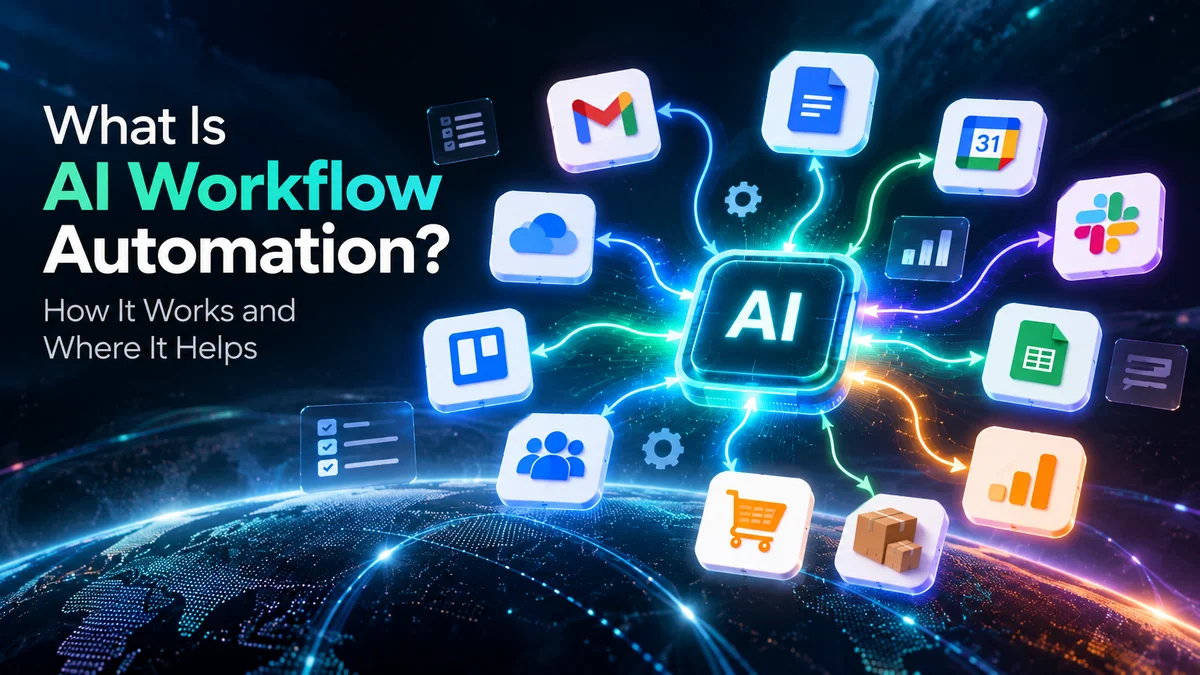
AI workflow automation is the use of artificial intelligence within automated workflows to handle tasks that require interpretation, classification, generation, or decision-making.
Traditional automation usually follows fixed rules. AI workflow automation adds AI to tasks that involve less predictable information. It can read emails, classify requests, summarize documents, extract information, generate responses, and trigger the next step automatically.
For businesses, this can reduce repetitive work and help teams process information faster. However, AI does not need to control every step. The best workflows usually combine AI for flexible tasks with traditional automation for predictable tasks.
What Is AI Workflow Automation?
AI workflow automation connects AI capabilities with a sequence of automated tasks.
A traditional workflow might follow a simple rule:
If a customer submits a form, add the information to the CRM.
An AI-powered workflow can handle a more complex situation:
When a customer submits a message, understand the request, identify its category, extract important details, and send the information to the right team.
The difference is important.
Traditional automation works well when the input and outcome are predictable. AI becomes useful when the workflow needs to interpret information before deciding what happens next.
A simple example
Imagine a business receives hundreds of customer emails every week.
A traditional workflow might:
- Detect a new email.
- Forward it to the support team.
- Create a ticket.
An AI-powered workflow can do more:
- Detect the new email.
- Read and understand the message.
- Identify the customer’s issue.
- Extract relevant information.
- Classify its priority.
- Create a support ticket.
- Send it to the appropriate team.
- Draft a response for review.
The AI handles the part that requires interpretation. Automation handles the predictable actions.
How Does AI Workflow Automation Work?
An AI workflow usually contains several connected steps.
A simple workflow can look like this:
Trigger → AI processing → Decision → Action → Result
For example:
New customer email
↓
AI reads the message
↓
AI identifies the request
↓
Workflow chooses the correct process
↓
CRM creates or updates the ticket
↓
Customer receives a response
The exact steps depend on the business process and the tools involved.
1. A trigger starts the workflow
Every automated workflow needs something that starts it.
Common triggers include:
- A new email
- A form submission
- A new CRM lead
- A support ticket
- A new document
- A calendar event
- A payment
- A new database record
For example, a new website inquiry could start a lead-processing workflow.
2. AI processes the information
The workflow sends relevant information to an AI system.
The AI might:
- Read text
- Summarize information
- Classify a request
- Extract details
- Identify sentiment
- Generate a response
- Categorize a lead
- Convert unstructured information into structured data
This is where AI adds flexibility.
3. The workflow decides what happens next
The AI output can determine the next step.
For example:
If the inquiry is a sales request → send it to sales.
If it is a support request → create a support ticket.
If it is urgent → notify a manager.
The exact decision logic depends on how the workflow is designed.
4. Automation performs the action
Once the workflow knows what should happen, automation can perform the predictable task.
It might:
- Update a CRM
- Send an email
- Create a task
- Notify an employee
- Add information to a spreadsheet
- Create a support ticket
- Store information in a database
This combination is where AI workflow automation becomes useful.
AI Workflow Automation vs Traditional Automation
AI workflow automation does not replace traditional automation.
Instead, the two can work together.
| Traditional Automation | AI Workflow Automation |
| Follows predefined rules | Can interpret information |
| Works well with predictable inputs | Can handle less structured inputs |
| Uses fixed conditions | Can classify or generate information |
| Produces predictable outputs | Outputs may require validation |
| Usually easier to test | Can require additional oversight |
| Best for repetitive rule-based tasks | Useful for tasks involving language or interpretation |
Consider a customer support workflow.
Traditional automation can route a ticket based on a selected category.
AI can read the customer’s message and determine which category fits.
The workflow can then use that classification to route the ticket.
The strongest setup often combines both approaches.
Where Does AI Workflow Automation Help?
AI workflow automation can help wherever employees repeatedly process information and take predictable follow-up actions.
Here are some practical examples.
Customer support
AI can read incoming customer messages and classify their requests.
The workflow can then create tickets and route them to the appropriate team.
Lead management
AI can analyze new inquiries and identify useful information.
The workflow can then update the CRM and notify the sales team.
Email management
AI can classify incoming emails based on their content.
The workflow can separate sales inquiries, support requests, invoices, and other messages.
Meeting management
AI can summarize meeting transcripts and identify action items.
The workflow can then turn those action items into tasks.
Document processing
AI can extract information from documents.
The workflow can then place that information into a database or business application.
Content workflows
AI can help draft, summarize, classify, or repurpose content.
Automation can then move the content through review and publishing stages.
AI Workflow Automation Examples for Small Businesses
AI workflow automation does not have to involve complex enterprise systems.
Small businesses can start with simple processes.
Example 1: Lead follow-up
A visitor submits a contact form.
The workflow can:
Form submission
↓
AI identifies the inquiry type
↓
CRM creates the lead
↓
Lead receives an acknowledgement
↓
Salesperson receives a notification
This reduces manual data entry and helps the team respond consistently.
Example 2: Customer support
A customer sends:
“My order arrived damaged. How can I get a replacement?”
AI can identify the issue as a damaged-order request.
The workflow can then create a support ticket and route it to the correct team.
A human can review the case before approving a replacement.
Example 3: Meeting follow-up
A team finishes a meeting.
AI summarizes the discussion and identifies action items.
The workflow can then create tasks for the relevant team members.
This removes several manual steps from the process.
What Tasks Are Best for AI Workflow Automation?
Not every business task needs AI.
AI workflow automation works particularly well when a task has three characteristics:
1. It happens repeatedly
The team performs the task regularly.
2. The information is difficult to process with simple rules
The workflow involves emails, documents, messages, or other unstructured information.
3. The next action can be defined
The workflow knows what should happen after the AI processes the information.
For example:
Read customer email → classify request → create ticket → notify team.
This is a good candidate for AI workflow automation.
What Tasks Should Not Be Fully Automated?
Some tasks require human judgment.
This is especially important when an incorrect decision could cause financial, legal, security, or customer-related problems.
For example, a business may use AI to classify a customer complaint.
But it may still require an employee to approve:
- Refunds
- Account closures
- Sensitive customer decisions
- High-value transactions
- Security-related actions
A useful principle is:
Automate the repetitive work, but keep human review where the consequences of an error are high.
This approach can make AI workflows more practical and safer.
AI Workflow Automation vs AI Agents
AI workflows and AI agents are related, but they are not necessarily the same thing.
An AI workflow generally follows a designed sequence of steps, with AI handling specific parts of the process.
An AI agent can have more flexibility in deciding which actions to take while working toward a goal.
For example:
AI workflow
Receive email → classify it → create ticket → notify team.
The sequence is largely predetermined.
AI agent
Investigate a customer’s issue, gather relevant information, check available resources, and determine which actions are needed.
The agent may have more freedom to decide how it approaches the task.
The terminology is still evolving. Different technology providers use terms such as AI agent, agentic workflow, and AI automation in different ways.
For businesses, the more useful question is often:
How much decision-making freedom does the system actually need?
If a process follows predictable steps, a conventional workflow may be enough.
If the process requires flexible decisions across several steps, an agent-based approach may be more appropriate.
What Are the Benefits of AI Workflow Automation?
Less repetitive work
Employees spend less time performing routine information-processing tasks.
Faster processing
Automated workflows can process information without waiting for someone to perform every manual step.
More consistent processes
A well-designed workflow can apply the same process to similar tasks.
Better use of employee time
Employees can focus more on tasks that require communication, creativity, analysis, and judgment.
Scalable operations
A workflow can process more requests without requiring every additional step to be performed manually.
However, these benefits depend on how well the workflow is designed.
AI does not automatically make a poor process better.
What Are the Limitations of AI Workflow Automation?
AI workflow automation also introduces new challenges.
AI can make mistakes
AI systems can misunderstand information or produce incorrect outputs.
Outputs may vary
Unlike a simple rule-based system, AI can produce different responses for similar inputs.
Sensitive information needs protection
Businesses should carefully consider what information they send to AI systems.
Workflows can become complicated
Connecting multiple applications, AI models, databases, and approval steps can create maintenance challenges.
Human oversight may still be necessary
Important decisions should not automatically be delegated to AI simply because automation is technically possible.
Costs can increase
AI models, software subscriptions, API usage, and supporting infrastructure can add costs as usage grows.
NIST’s Generative AI Risk Management Profile highlights several risks organizations should consider when deploying generative AI systems. These include risks related to inaccurate information, privacy, security, and human oversight.
How to Start With AI Workflow Automation
You do not need to automate an entire business at once.
Start with one repetitive process.
Step 1: Find a repetitive task
Look for a task employees perform frequently.
For example:
Reading and categorizing customer emails.
Step 2: Identify where AI adds value
Ask:
Does this task require understanding text, extracting information, or making a classification?
If yes, AI may be useful.
Step 3: Keep predictable actions automated
Don’t use AI for tasks that simple automation can handle reliably.
For example:
Add a lead to CRM.
A normal automation rule may be enough.
Step 4: Add human review where needed
For important decisions, create an approval step.
Step 5: Measure the workflow
Track:
- Time saved
- Error rates
- Processing volume
- Cost
- Human interventions
- Customer response time
Then improve the workflow based on actual results.
What Tools Can Be Used for AI Workflow Automation?
Different tools serve different needs.
Some platforms focus on connecting applications and automating workflows. Others provide AI models, AI agents, or more advanced orchestration capabilities.
Common categories include:
- Workflow automation platforms
- AI model platforms
- CRM systems
- Customer support platforms
- Database tools
- Business productivity platforms
- API-based automation tools
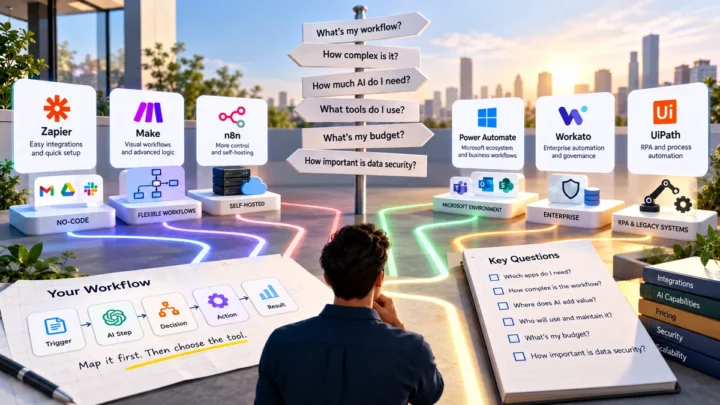
Popular workflow platforms include tools such as Zapier, Make, and n8n. Their capabilities and approaches differ, so businesses should evaluate them based on their workflow requirements rather than choosing a tool simply because it is popular.
We’ll cover individual tools and platform comparisons in separate Your Tech Read guides.
How to Decide If Your Business Needs AI Workflow Automation
Use this simple checklist.
Consider AI workflow automation if:
- Your team performs the same process repeatedly.
- Employees regularly process emails or documents.
- Your workflow contains unstructured information.
- Manual data entry consumes significant time.
- You already use several business applications.
- The next action can be clearly defined.
- You can review important AI outputs.
Start with traditional automation if:
- The task follows simple rules.
- The input is structured.
- The output is predictable.
- AI does not add meaningful value.
This distinction can prevent businesses from adding unnecessary AI to simple workflows.
A Simple AI Workflow Decision Framework
Before automating a task, ask five questions:
Is the task repetitive?
If yes, automation may help.
Does it involve unstructured information?
If yes, AI may add value.
Does the task require interpretation?
If yes, consider an AI step.
Is the result high-risk?
If yes, keep human review.
Can the result be checked?
If yes, the workflow may be easier to manage safely.
This framework can help businesses decide where AI belongs in a workflow instead of simply asking where AI can be added.
Related guides: AI for Small Business: A Practical Guide to Tools, Automation and Privacy
Frequently Asked Questions
What is AI workflow automation?
AI workflow automation uses artificial intelligence inside automated processes. It allows workflows to interpret information, classify data, generate content, or support decisions before triggering subsequent actions.
What is the difference between AI automation and traditional automation?
Traditional automation usually follows predefined rules. AI automation can process less structured information and perform tasks involving interpretation, classification, or generation.
Is AI workflow automation the same as an AI agent?
No. A workflow usually follows a designed process. An AI agent can have greater flexibility in deciding which actions to take toward a goal.
Can small businesses use AI workflow automation?
Yes. Small businesses can start with simple workflows such as lead qualification, customer email classification, meeting summaries, and data extraction.
Does AI workflow automation replace employees?
Not necessarily. Many workflows are designed to reduce repetitive work while keeping people involved in review, decision-making, and customer interactions.
Is AI workflow automation expensive?
The cost depends on the tools, AI models, integrations, usage volume, and workflow complexity. A simple workflow can cost much less than a complex multi-system implementation.
Final Takeaway
AI workflow automation is not simply about adding AI to every business process.
It works best when AI handles tasks that require interpretation, classification, generation, or flexible decision-making, while conventional automation handles predictable actions.
A practical workflow might therefore look like this:
AI understands the information → automation performs the action → human reviews important decisions.
For businesses, the best starting point is usually one repetitive process with a clear outcome. Test it, measure the results, and expand only when the workflow delivers a real improvement.
As AI automation develops, the key question will not be “Where can we use AI?”
It will be:
“Which part of this workflow actually benefits from AI?”