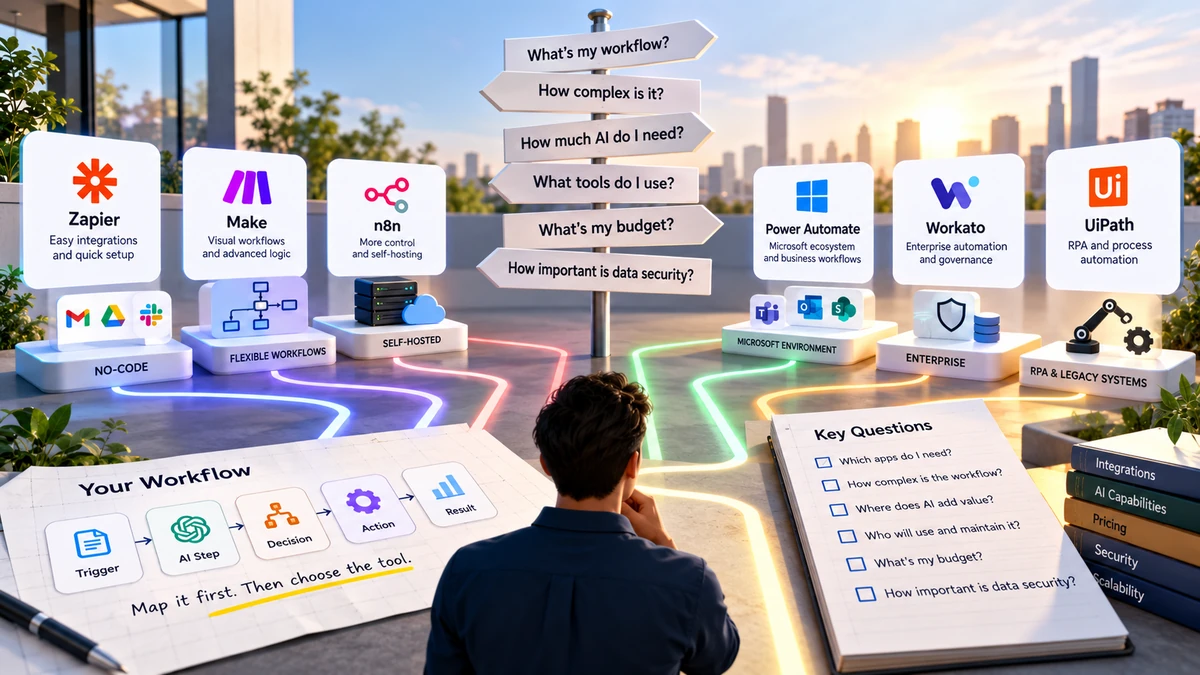
Choosing an AI workflow automation tool starts with the workflow itself. Look at the apps you need to connect, the complexity of the process, where AI is actually useful, how much control you need, and how the platform charges for usage.
There are more AI automation tools than ever.
Some are designed for simple no-code automations. Others are built for complex workflows, developer-led projects, enterprise systems, self-hosting, or AI-heavy processes.
That makes choosing one more difficult than it first appears.
The solution isn’t to compare every feature on every platform.
Start with the work you want to automate.
Once you understand the workflow, you can work backward and identify the type of automation platform you actually need.
Start With the Workflow, Not the Tool
Before opening a comparison page or signing up for a platform, describe the process you want to automate.
For example:
New customer email
↓
AI reads the message
↓
Classifies the request
↓
Chooses a path
↓
Creates a task
↓
Notifies the right team
That is your workflow.
Only after you understand those steps should you ask which platform can build it.
This approach matters because automation platforms aren’t all designed around the same problems. Current 2026 comparisons include general workflow platforms, self-hosted systems, enterprise orchestration platforms, Microsoft-focused automation, and AI-first tools.
A simple workflow map
Before choosing a tool, write down:
Trigger → AI task → Decision → Action → Human review → Result
You may not need every step.
The point is to understand what the system actually has to do.
What Type of Workflow Are You Building?
This is one of the most useful questions to answer before comparing tools.
1. A simple workflow
Example:
New form submission → Add information to spreadsheet
This doesn’t necessarily need sophisticated AI.
A straightforward automation platform may be enough.
2. An AI-assisted workflow
Example:
New email → AI summarizes it → Save summary
Here, the workflow is still predictable, but one step requires AI to understand the information.
This is where an AI-enabled automation platform can become useful.
3. A multi-step workflow
Example:
New lead
↓
AI extracts company information
↓
Check lead type
↓
If qualified → CRM
↓
If incomplete → request information
↓
Notify salesperson
Now you need stronger workflow logic, branching, conditions, and multiple actions.
4. An agent-based workflow
This is different again.
Instead of giving the system a completely fixed sequence, you give it a goal and allow AI to determine some of the steps needed to accomplish it.
For example:
Goal: Research a potential customer
↓
AI decides what information is missing
↓
Uses available tools
↓
Checks the results
↓
Chooses the next action
This is closer to an agentic workflow.
A conventional AI workflow generally follows a defined sequence, while an agentic workflow can determine actions dynamically while pursuing a goal.
You don’t automatically need an AI agent just because a platform offers one.
For many business processes, a clearly defined workflow is easier to understand, test, and control.
The 8 Things to Check Before Choosing an AI Automation Tool
Once you’ve mapped your workflow, evaluate the platform against these eight areas.
1. Can It Connect to the Apps You Already Use?
This should be one of the first checks.
Suppose your workflow uses:
- Gmail
- Google Sheets
- Slack
- HubSpot
Your automation platform needs to work with those systems.
A platform with thousands of integrations isn’t necessarily useful if it doesn’t support the applications your business depends on.
Zapier currently advertises more than 9,000 app integrations, while other platforms take different approaches to integrations, APIs, and custom connections.
So don’t ask:
How many integrations does this platform have?
Ask:
Does it connect reliably to the applications my workflow actually needs?
That’s a much more useful question.
2. Can It Handle the Complexity of Your Workflow?
A workflow with two steps is very different from one with twenty.
Check whether the platform supports the logic you need.
You may need:
- Conditions
- Branches
- Filters
- Loops
- Delays
- Webhooks
- API requests
- Data transformation
- Approvals
- Error handling
For example:
Customer inquiry
↓
AI classification
↓
Is it sales?
Yes → Sales CRM
No → Support system
↓
Notify team
If your platform can’t comfortably represent this logic, you may quickly outgrow it.
3. What Can the AI Actually Do?
Don’t be impressed simply because a platform has an AI label.
Ask what the AI is actually capable of doing.
Depending on the platform, AI may help with:
- Classification
- Summarization
- Information extraction
- Content generation
- Document processing
- Data enrichment
- Decision support
- Agentic actions
For example, there is a significant difference between:
AI generates an email
and:
AI analyzes information, determines what needs to happen, uses another application, checks the result, and continues the workflow.
The second requires considerably more sophisticated workflow capabilities.
Current AI automation platforms increasingly combine traditional workflow automation with AI steps, agents, and orchestration.
4. How Easy Is It to Build and Maintain?
A workflow isn’t finished when you create it.
Someone has to maintain it.
Ask:
Who will build it?
Who will fix it if it breaks?
Who will modify it when the business process changes?
A technically powerful platform may not be the most practical choice if the people maintaining the workflows aren’t comfortable with it.
For beginners
Look for:
- Visual workflow builders
- Templates
- Clear documentation
- Simple testing
- Easy troubleshooting
For technical teams
You may want:
- APIs
- Webhooks
- Custom code
- Advanced workflow logic
- Greater infrastructure control
The right level of complexity depends on the people who will actually use the platform.
5. Where Will Your Business Data Go?
This question becomes especially important when workflows handle customer or business information.
Before connecting a system, understand:
- What information the workflow processes
- Where that information is sent
- Which services receive it
- Who can access it
- How credentials are managed
- What permissions are available
- What logs or audit information are provided
For example, a workflow processing a public newsletter subscription is very different from one processing confidential customer documents.
Current AI automation guidance increasingly emphasizes permissions, data handling, governance, error handling, and human approvals as workflows move from experiments into production.
Don’t treat security as something to check after choosing the tool.
Include it in the selection process.
6. Can You See When Something Goes Wrong?
Automation is useful only when you can understand what happened when something fails.
Look for features that let you inspect:
- Workflow runs
- Errors
- Failed steps
- Input and output data
- Execution history
- Logs
- Retry options
Imagine this workflow:
Form → AI → CRM → Email
If the CRM step fails, you should be able to identify that failure.
Otherwise, you may not discover the problem until someone notices that the expected task never arrived.
As workflows become more complex, visibility becomes increasingly important.
7. Understand How the Platform Charges You
This is where many comparisons become misleading.
A platform might charge based on:
- Tasks
- Operations
- Workflow executions
- Credits
- Users
- AI usage
- API usage
- Compute
- Features or plans
So don’t compare only the advertised starting price.
Calculate your actual usage
Suppose your workflow runs:
2,000 times per month
and each run performs:
6 billable operations
That’s:
2,000 × 6 = 12,000 operations
Your actual requirement is therefore very different from someone running the same platform 100 times a month.
Current tool comparisons show that automation platforms use different pricing and usage models, so the advertised entry price doesn’t tell the whole story.
Before subscribing, ask:
What exactly counts as billable usage?
That question can save you from an unpleasant pricing surprise later.
8. Will It Still Work When Your Workflow Grows?
Your first automation might process 50 tasks per month.
Eventually it could process 5,000.
Or you might build 20 workflows instead of one.
Think about:
- Workflow volume
- Number of users
- Number of connected applications
- Data volume
- Number of AI calls
- Monitoring requirements
- Team permissions
- Administration
A platform that works perfectly for one small workflow may not be the same choice for a large organization.
This is why scalability should be considered before your automation becomes business-critical.
No-Code, Low-Code or Self-Hosted?
You may encounter these terms when comparing automation platforms.
They essentially describe different levels of control and technical involvement.
No-code
You build workflows mainly through visual interfaces.
This can be useful when:
- You aren’t a developer
- You want to get started quickly
- Your workflows use common applications
- You don’t need extensive customization
Low-code
You still use visual workflow tools, but have more options for custom logic, APIs, scripts, or technical configuration.
This can be useful for more complicated processes.
Self-hosted
The software can be deployed in infrastructure that you control, depending on the product and licensing model.
n8n, for example, currently offers a self-hosted Community Edition and positions self-hosting as a way to retain greater control over data and infrastructure.
But greater control can also mean greater responsibility.
Someone needs to understand:
- Deployment
- Updates
- Security
- Backups
- Infrastructure
- Troubleshooting
So self-hosted doesn’t simply mean better or worse.
It means a different set of responsibilities and trade-offs.
How Much AI Do You Actually Need?
This question deserves its own section because AI marketing can make simple automation seem more complicated than it needs to be.
Consider these three workflows.
Workflow A
New order → Send confirmation
No AI required.
Workflow B
Customer email → AI identifies the request → Route to team
AI adds value because the system needs to interpret natural language.
Workflow C
Goal → AI determines steps → Uses several tools → Reviews results → Decides what to do next
This is much closer to an agentic system.
The important lesson is:
Don’t add AI just because the platform offers it.
Use AI when the task actually benefits from it.
This also connects directly to our earlier article on AI Workflows vs AI Agents.
How Different Platforms Fit Different Needs
Rather than declaring one universal winner, look at what different types of platforms are designed to handle.
| If you need… | Look for… |
| Simple app-to-app automation | Easy visual builder and broad integrations |
| More complicated visual workflows | Strong branching and workflow logic |
| Technical customization | APIs, webhooks and custom code |
| Greater infrastructure control | Self-hosting options |
| Microsoft-heavy environment | Deep Microsoft ecosystem integration |
| Enterprise orchestration | Governance, permissions and administration |
| UI/legacy application automation | RPA capabilities |
| AI-heavy data processing | Strong AI and unstructured-data capabilities |
For example, current market guides position Zapier around broad app connectivity and AI-enabled orchestration, n8n around self-hosting, Microsoft Power Automate around Microsoft’s ecosystem, and UiPath around UI/RPA automation.
These are different strengths, not a universal ranking.
Check Your Existing Software Before Choosing a New Platform
Your existing technology stack should influence the decision.
Suppose your company already works heavily with Microsoft 365.
In that situation, Microsoft Power Automate is worth evaluating because its automation capabilities are deeply connected with Microsoft’s ecosystem.
Or suppose your workflow needs a large number of third-party applications.
Then broad integration coverage becomes more important.
Or perhaps your team needs infrastructure control.
Then self-hosting may become an important requirement.
The point is simple:
Don’t choose an automation platform in isolation from the rest of your technology stack.
Don’t Choose a Tool Before Testing a Real Workflow
This is one of the most practical recommendations in this guide.
Don’t evaluate a platform only by watching its demo.
Take one real process.
For example:
New lead → AI qualification → CRM → notification
Build it.
Then test:
Normal input
Does it work?
Missing information
What happens?
Unexpected input
Does the workflow fail gracefully?
Incorrect AI output
Can someone intervene?
Failed connection
Can you identify and recover from the error?
Higher volume
Does the workflow remain practical?
This gives you much more useful information than simply reading a feature list.
A Simple AI Automation Tool Selection Checklist
Before choosing a platform, answer these questions.
About the workflow
☐ What exactly am I automating?
☐ What starts the workflow?
☐ What applications are involved?
☐ Where does AI actually add value?
☐ Does the workflow need branching?
☐ Does it need human approval?
About the platform
☐ Does it support my required integrations?
☐ Can it handle the workflow complexity?
☐ Can my team use it?
☐ Can I monitor failures?
☐ Can I control permissions?
☐ Does it handle my data appropriately?
☐ How does its pricing model work?
☐ Can it scale with my expected usage?
Before committing
☐ Can I test the platform?
☐ Have I built one real workflow?
☐ Have I tested unusual cases?
☐ Have I calculated the likely monthly cost?
☐ Do I know who will maintain it?
If you can’t answer these questions yet, you’re probably not ready to choose the platform.
And that’s okay.
Define the workflow first.
A Quick Decision Guide
You can use this as a starting point.
You want to automate a few simple business tasks
Look for a simple no-code automation platform with the integrations you already use.
Your workflows contain many branches and conditions
Look for a flexible visual workflow builder.
Your team is technical and needs APIs or custom logic
Look for a low-code or developer-oriented platform.
You need more control over infrastructure
Investigate self-hosted options and understand the additional maintenance involved.
Your business relies heavily on Microsoft products
Evaluate Microsoft-focused automation capabilities alongside general-purpose platforms.
You’re automating legacy desktop applications
Look at RPA-oriented platforms, particularly where APIs aren’t available. Current automation guides distinguish RPA from API-based workflow automation for precisely this reason.
Your workflow processes large amounts of unstructured information
Look for platforms with strong AI extraction, classification and data-processing capabilities. Current AI automation comparisons specifically distinguish this category from general workflow automation.
What Not to Do
Don’t choose based only on popularity
A popular platform may still be a poor fit for your particular workflow.
Don’t choose based only on the number of integrations
You only need the integrations relevant to your work.
Don’t choose based only on the cheapest plan
Understand what counts toward usage.
Don’t add AI to every step
Traditional automation is often enough for predictable actions.
Don’t ignore maintenance
Someone has to manage the workflow after it goes live.
Don’t skip security
Especially when customer, financial, employee, or confidential business information is involved.
The Bottom Line
There isn’t one AI workflow automation tool that fits every business.
The right choice depends on what you’re automating, how complicated the workflow is, which applications are involved, how much AI you need, who will maintain it, what level of control you require, and how the platform charges for usage.
So don’t start with:
“Which AI automation tool is the best?”
Start with:
“What does my workflow actually require?”
Then work backward.
Map the process.
Identify the AI steps.
List the integrations.
Check the workflow complexity.
Evaluate security and control.
Calculate the real cost.
Test one real workflow.
Only then choose the platform.
The best automation tool for your business is not the one with the longest feature list. It is the one that fits the work you actually need to automate.
Related guides: AI for Small Business: A Practical Guide to Tools, Automation and Privacy
Frequently Asked Questions
What is an AI workflow automation tool?
It is software that connects applications and automates a sequence of tasks while allowing AI to handle tasks such as classification, summarization, extraction, generation, or other forms of interpretation.
Do I need coding skills to use AI workflow automation tools?
Not necessarily. Many platforms provide visual, no-code builders. More complex workflows may benefit from APIs, custom code, or technical knowledge.
What should I look for in an AI automation platform?
Start with integrations, workflow logic, AI capabilities, ease of use, security, monitoring, pricing, and scalability.
Is an AI agent the same as an AI workflow?
No. A conventional AI workflow generally follows a defined sequence, while an agentic workflow can determine some of its actions dynamically while pursuing a goal.
Are AI automation tools expensive?
Costs vary considerably. Some platforms offer free tiers, while others charge according to users, tasks, operations, executions, credits, AI usage, or other measures. The important thing is to calculate the cost using your expected workflow volume rather than comparing starting prices alone.
Should a small business use an AI workflow automation tool?
It can be useful when a business has repetitive processes that involve multiple applications or information that benefits from AI processing. The value depends on the particular workflow and the cost of implementing and maintaining it.
Can I switch automation platforms later?
Yes, but moving workflows can require rebuilding integrations, logic, credentials, and testing. That’s another reason to test your process before committing heavily to a platform.