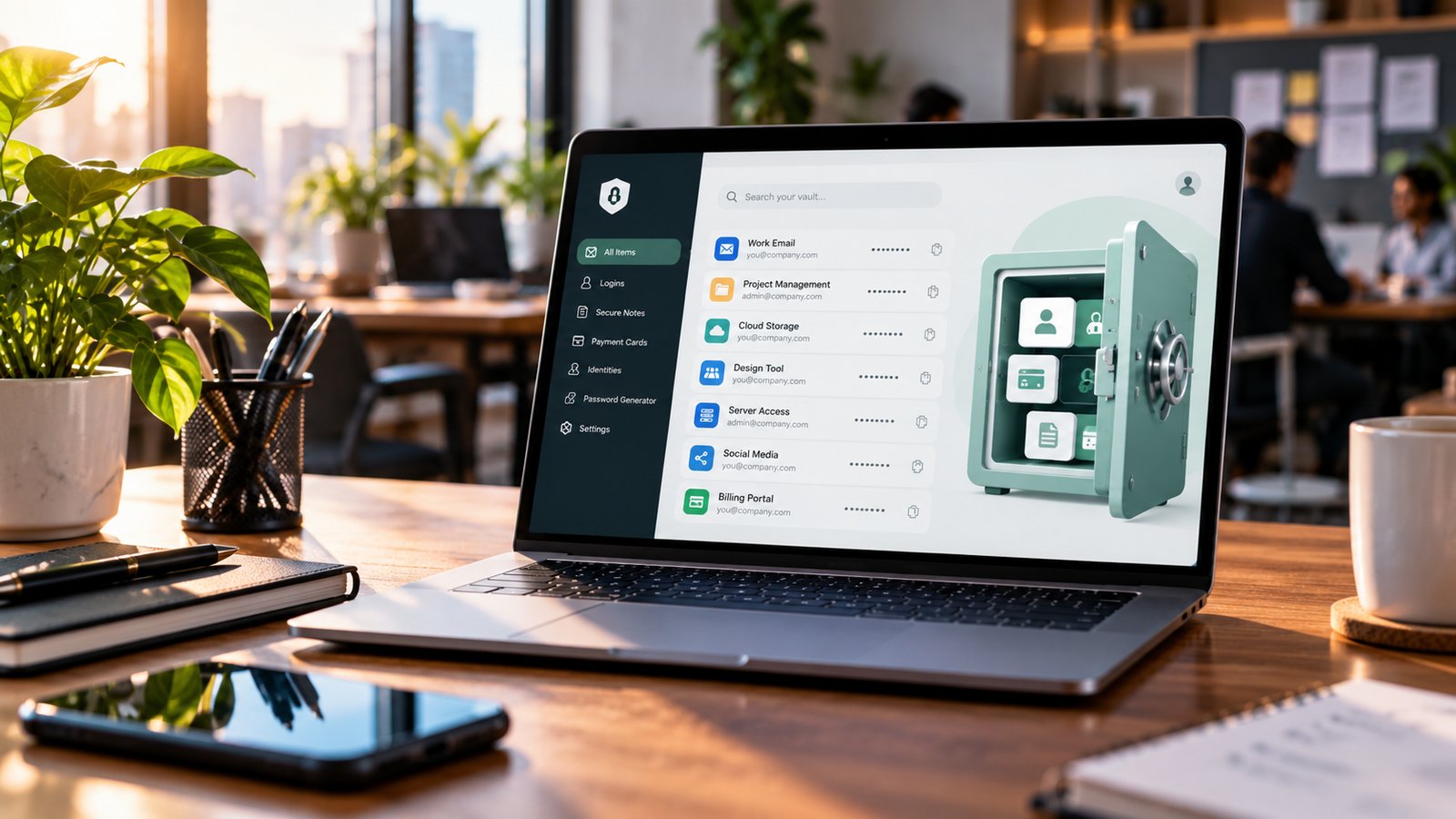
The best password manager for small business in 2026 is 1Password Business for most teams. If budget matters most, Bitwarden Teams does the job for under half the price. Keeper suits teams that need strict admin control, NordPass is the easiest to roll out, and Proton Pass is the cheapest privacy-first option.
One reused password is all it takes. Someone on your team uses the same password for the company email and a random shopping site, that site gets breached, and now a stranger can read your invoices. Most small businesses don’t get hacked by geniuses. They get hacked through shared spreadsheets, sticky notes and “Company@123”.
A password manager fixes this for a few dollars per person per month. It creates strong passwords, fills them in for your team, and lets you share logins without ever showing the actual password. When someone leaves, you remove their access in one click.
I looked at the five business password managers that small teams actually shortlist and compared them on price, ease of setup, sharing, admin controls and security track record. Here is what each one is best at.
Quick picks
- Best overall: 1Password Business — the most polished experience your team will actually use
- Best value: Bitwarden Teams — open source, audited, $4 per user
- Best for admin control: Keeper Business — detailed policies and reporting
- Easiest to roll out: NordPass Business — clean apps, very little training
- Best budget privacy pick: Proton Pass for Business — from $1.99 per user, Swiss privacy
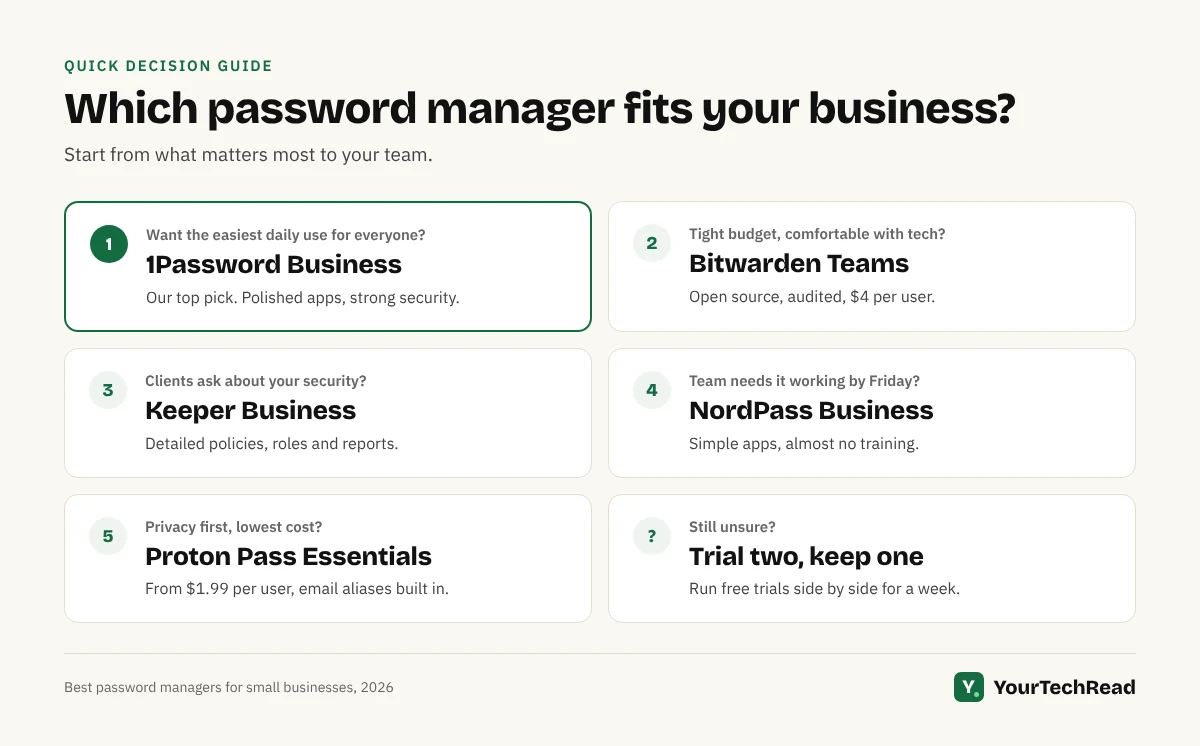
Strong passwords + one place to store them + controlled sharing = fewer ways in for attackers
Best password manager for small business: side-by-side comparison
Prices are per user per month, billed yearly, in US dollars, as listed in October 2026. Vendors change prices and run promotions often, so check the plan page before you buy.
| Password manager | Starting price | Plan to pick | Free trial | Best for |
| 1Password | $8.99 (Business) or $24.95/month flat for up to 10 people (Teams Starter Pack) | Teams Starter Pack under 10 people, Business above | 14 days | Teams who want the smoothest daily experience |
| Bitwarden | $4 (Teams) | Teams | Yes | Tight budgets, technical teams, open-source fans |
| Keeper | $2 (Business Starter, 5–10 users) | Business ($3.75) | Yes | Owners who want detailed policies and reports |
| NordPass | About $1.79 (Teams, 10-user pack) | Business (about $3.59) | Yes | Non-technical teams who need it to just work |
| Proton Pass | $1.99 (Essentials, minimum 3 users) | Essentials, or Professional ($4.49) for SSO | 14 days | Privacy-minded teams on a budget |
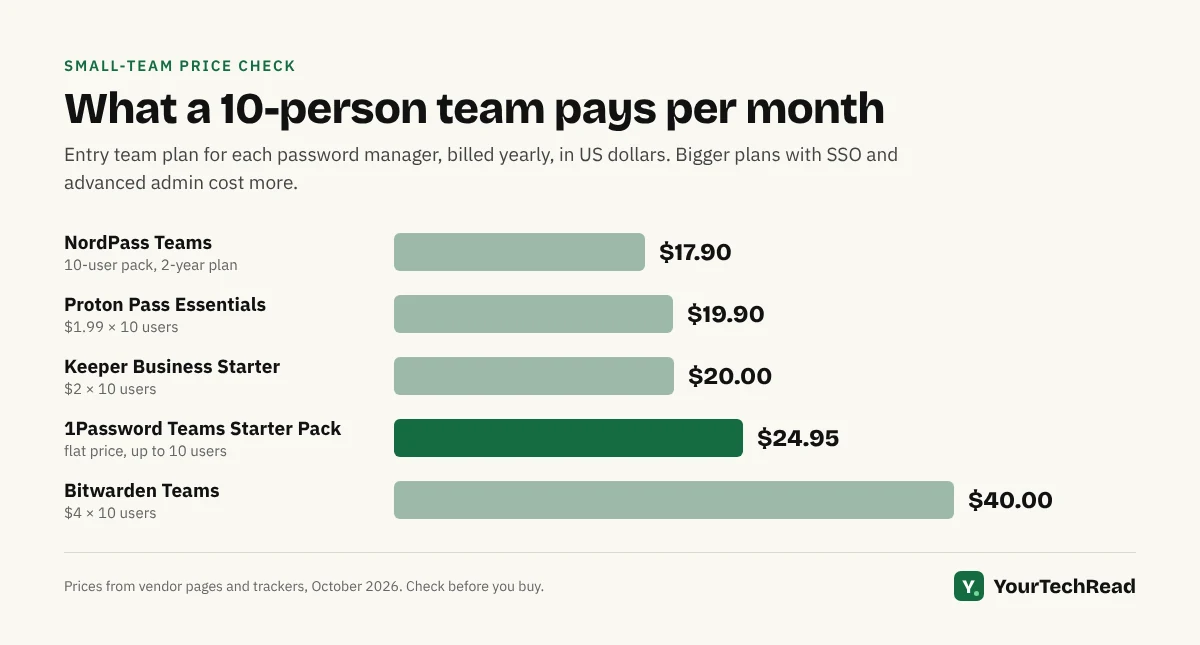
Under 10 people: 1Password Teams Starter Pack or Bitwarden Teams. 10–50 people: 1Password Business, Keeper Business or NordPass Business.
1. 1Password Business: best overall
Price: $8.99 per user per month (Business), or $24.95 per month for up to 10 people with the Teams Starter Pack. 14-day free trial.
1Password is the one your team is least likely to fight. The apps are fast on Mac, Windows, iPhone, Android and Linux, autofill works on almost every login page, and new people are usually set up in minutes.
Security is its strongest selling point. Your vault is protected by your main password plus a separate Secret Key that never leaves your devices. So even if someone stole 1Password’s servers, they would still need that key for every single account.
What stands out
- Watchtower flags weak, reused and breached passwords across the team
- Shared vaults with clear permissions (view only, edit, manage)
- Guest accounts for freelancers and contractors on the Business plan
- Sign-in through Okta, Microsoft Entra ID, Google Workspace and others on Business
What to watch
- The most expensive pick here once you pass 10 people
- No free plan for teams, only the trial
Pick it if your team is not technical, you want something people actually use every day, and you are happy to pay a little more for that.
2. Bitwarden Teams: best value
Price: $4 per user per month (Teams), $6 for Enterprise. Free trial available.
Bitwarden is open source, which means its code is public and regularly checked by outside security firms. For a small business that cannot afford a security team, that openness is reassuring.
You get almost everything a 5–50 person team needs at less than half the price of 1Password: shared collections, event logs, directory sync and automatic user setup with SCIM. Enterprise adds single sign-on, stricter policies and the option to host it on your own server.
What stands out
- Lowest price of the big-name tools for full team features
- Open source and independently audited
- Generous free plan for personal use, so staff can try it first
What to watch
- The apps work well but look plainer than 1Password or NordPass
- Non-technical staff may need a short walkthrough at the start
Pick it if you want solid security on a tight budget, or your team is comfortable with tech.
3. Keeper Business: best for admin control
Price: $2 per user per month for Business Starter (5–10 users), $3.75 for Business. Billed yearly. Free trial available.
Keeper is built for the person who has to answer “who has access to what?”. The admin console lets you set password rules, enforce two-factor login, split the team into groups and pull detailed reports when a client or auditor asks.
The Business plan also gives every employee a free Keeper Family plan for personal use. That matters more than it sounds: people who use a password manager at home make fewer mistakes at work.
What stands out
- Detailed role-based permissions and delegated admin
- Strong reporting for compliance and client security questionnaires
- Free family plan for each business user
What to watch
- Useful extras such as dark web monitoring (BreachWatch) cost more
- The admin console has a lot of settings, so setup takes longer
Pick it if you handle client data, face security reviews, or simply want tight control.
4. NordPass Business: easiest to roll out
Price: around $1.79 per user per month for Teams (10-user pack) and around $3.59 for Business. Prices change with promotions, so check the current offer. Free trial available.
NordPass comes from the team behind NordVPN, and it shows in the polish. The apps are simple, the browser extension is clear, and most people can start saving and sharing passwords without any training.
The Business plan adds group sharing, password health reports and data breach alerts. Teams can sign in with Google Workspace, and bigger plans add Microsoft Entra ID and Okta.
What stands out
- Very easy for non-technical staff
- Breach monitoring included on Business
- Low price, especially with yearly billing
What to watch
- Teams is sold in packs of 10, so it can cost more than expected for a 4-person team
- Fewer advanced admin options than Keeper or 1Password
Pick it if you want the whole team using a password manager by Friday with almost no hand-holding.
5. Proton Pass for Business: best budget privacy pick
Price: $1.99 per user per month for Pass Essentials, $4.49 for Pass Professional (billed yearly, minimum 3 users). 14-day free trial.
Proton is the Swiss company behind Proton Mail. Proton Pass is open source and end-to-end encrypted, and it includes something the others don’t: hide-my-email aliases. Your team can sign up for tools and newsletters without exposing real work addresses, which cuts down spam and phishing.
Essentials covers unlimited vaults, sharing, passkeys and a built-in two-factor code generator. Professional adds single sign-on, automatic user setup and activity logs.
What stands out
- Cheapest paid business option on this list
- Email aliases built in
- Fits neatly if you already use Proton Mail or Proton Drive
What to watch
- Younger product, so admin features are still catching up
- Fewer integrations with business tools than 1Password or Keeper
Pick it if privacy is a priority, or you already run your business on Proton.
What about LastPass and Dashlane?
LastPass was once the default choice for small teams. In 2022 attackers stole encrypted customer vault backups, and that history makes it hard to recommend when equally priced options have cleaner records.
Breached vault backups → weak master passwords cracked offline → business logins exposed
Dashlane is a good product with strong security, but its business plans have changed names and prices several times, and it usually costs more than the picks above for similar features. It is worth a look if you also want its phishing alerts.
How to choose the right password manager for your business
Skip the feature lists. For a small team, five questions decide it.
- How many people, now and in a year? Under 10, a flat-price pack (1Password Teams Starter Pack) or a cheap per-user plan (Bitwarden, Proton Pass) wins. Past 10, compare per-user prices.
- How technical is your team? If people struggle with new apps, pay for 1Password or NordPass. A tool nobody uses protects nothing.
- Do you work with freelancers or clients? Look for guest accounts or easy one-off sharing so you never send a password by WhatsApp or email again.
- Do you sign in with Google Workspace or Microsoft 365? If yes, check the plan includes single sign-on with your provider, so joining and leaving is automatic.
- Do clients ask about your security? Keeper and 1Password give you the reports and policies that make security questionnaires easy to answer.
The best password manager is the one your whole team uses every day, not the one with the longest feature list.
How to roll it out in one week
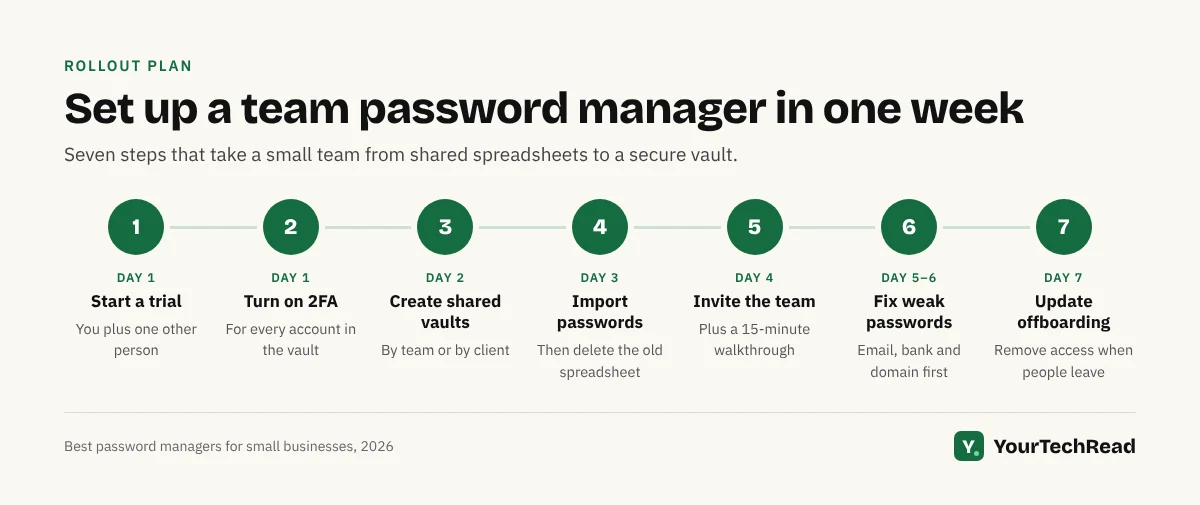
Most small businesses buy a password manager and then never finish moving passwords into it. Use this checklist to get it done.
☐ Start the free trial with two people (you and your most-used shared login owner)
☐ Turn on two-factor login for every account in the password manager
☐ Create shared vaults by team or client, for example “Marketing”, “Finance”, “Client: Acme”
☐ Import passwords from browsers and old spreadsheets, then delete the spreadsheet
☐ Invite the rest of the team and run a 15-minute walkthrough
☐ Use the security report to change every weak or reused password, starting with email, banking and your domain host
☐ Add “remove from password manager” to your offboarding steps
If your team still tracks customers in a spreadsheet, the same logic applies there too. See our guide on CRM vs spreadsheet for small business. And if you are automating your business tools, store every API key and app login in the password manager, not in your workflow tool. Our AI workflow automation guide explains how those connections work.
Related guides: Small Business Cybersecurity: The Complete Guide
Frequently Asked Questions
Do small businesses really need a password manager?
Yes. Stolen and reused passwords are one of the most common ways attackers get into small businesses. A password manager costs a few dollars per person per month, far less than recovering a hacked email account or a drained ad account.
Is a free password manager good enough for a business?
For one freelancer, a free plan like Bitwarden Free can be enough. Once two or more people share logins, you need a business plan for shared vaults, admin control and the ability to remove someone’s access when they leave.
Are password managers safe if they get hacked?
The good ones use zero-knowledge encryption, which means the company cannot read your vault. Even if their servers are breached, attackers get scrambled data. Your protection is a long, unique master password plus two-factor login.
What is the cheapest password manager for a small business?
Proton Pass Essentials ($1.99 per user) and Keeper Business Starter ($2 per user, for 5–10 people) are the lowest listed prices. Bitwarden Teams at $4 is the best value for a full set of team features.
Can I use the browser’s built-in password manager instead?
Chrome, Edge and Safari can save passwords, but they are built for individuals. You cannot safely share logins with a team, set rules, see who has access or remove a departing employee’s access in one place.
Can I share passwords with freelancers without showing them the password?
Yes. Most business password managers let you share a login so it autofills without the person seeing the actual password. 1Password guest accounts and one-time sharing links in Bitwarden and NordPass work well for this.
Final verdict
For most small businesses, 1Password Business is the best password manager: secure, polished, and easy enough that your whole team will actually use it. If cost is the deciding factor, Bitwarden Teams gives you nearly everything for less than half the price. Start a free trial with two people this week, move your shared logins in, and you will have closed one of the easiest doors attackers use.