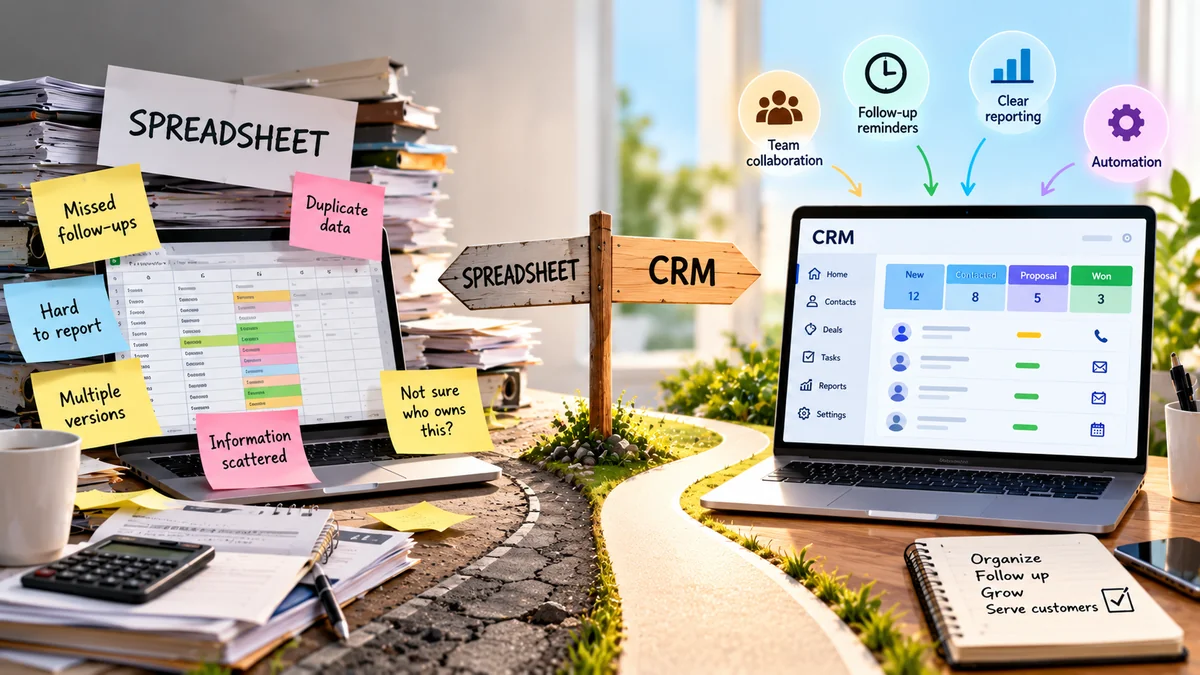
A spreadsheet can be a perfectly good way to keep track of customers.
When there are only a few customers, one person is handling follow-ups, and the process is simple, a spreadsheet may be all a business needs.
The problem starts when the spreadsheet becomes something the business has to remember to manage rather than a simple tool that helps it manage customers.
Follow-ups get missed. Customer information ends up in different places. Nobody knows who is supposed to contact a lead. A manager asks for a report, and someone spends an afternoon cleaning up a spreadsheet.
That is usually when the CRM question appears:
Should we keep using the spreadsheet, or is it time to move to a CRM?
The answer isn’t based simply on how many employees you have or how many customers you have.
It depends on how complicated your customer-management process has become.
CRM vs Spreadsheet: The Short Answer
If one person manages a small number of customers, follow-ups are simple, and everything is easy to see in one spreadsheet, staying with a spreadsheet can make sense.
A CRM becomes more useful when you need things such as:
- Follow-up reminders
- Clear ownership of leads
- Customer interaction history
- Different sales stages
- Shared information between team members
- Automatic tasks
- Easier reporting
- Connections with other business tools
Recent comparisons from 2026 make a similar distinction: spreadsheets remain practical for simple, low-volume customer tracking, while CRMs become more useful as shared ownership, follow-up, history, and reporting become harder to manage manually.
So the real question isn’t:
“Is a CRM better than a spreadsheet?”
It is:
“Can my current spreadsheet still handle the way my business works?”
What Is a Spreadsheet Being Used for?
For this article, think of a spreadsheet such as Excel or Google Sheets as a simple table containing customer information.
It might look something like this:
| Customer | Phone | Status | Last Contacted | Next Action | |
| ABC Ltd | 555-1234 | [email protected] | New | Sept 20 | Call |
| XYZ Co | 555-5678 | [email protected] | Quote Sent | Sept 22 | Follow up |
| Green Tech | 555-9012 | [email protected] | Won | Sept 24 | Onboard |
For a small business, this can work extremely well.
You can sort it.
You can filter it.
You can add columns.
You can create formulas.
And most importantly, people already know how to use it.
There’s no need to introduce a complicated system when a simple one is doing the job.
What Is a CRM?
CRM stands for Customer Relationship Management.
A CRM is software designed specifically to organize information about customers and potential customers and the interactions a business has with them.
Instead of treating a customer as simply one row in a spreadsheet, a CRM can keep related information together.
For example:
Customer
↓
Contact information
↓
Previous conversations
↓
Sales opportunity
↓
Tasks
↓
Follow-up
↓
Notes
↓
Next action
This is one of the biggest differences between the two.
A spreadsheet mainly gives you a table of information.
A CRM is designed to help you manage the work happening around that information.
A Spreadsheet Can Be the Right Choice
This is something many CRM comparison articles don’t emphasize enough.
A spreadsheet isn’t automatically a problem.
If your business has:
- One person handling customers
- A small number of active leads
- Simple follow-ups
- One main source of enquiries
- Little need for automation
- No complicated reporting requirements
then a spreadsheet may still be completely reasonable.
For example, imagine a freelance designer who has 20 active clients and manages every relationship personally.
A simple spreadsheet containing:
Client → Project → Status → Last Contact → Next Action
may be all that is needed.
Moving to a CRM just because other businesses use one could add unnecessary cost and setup work.
Recent 2026 comparisons make the same point: the number of customers alone isn’t a reliable trigger for switching; the complexity of the workflow matters more.
Where a Spreadsheet Starts to Become Difficult
The problem usually isn’t that spreadsheets suddenly stop working.
The problem is that more work starts depending on the spreadsheet being perfectly maintained.
For example:
A lead arrives.
Someone adds it to the spreadsheet.
Another person talks to the customer.
They update one cell.
Someone else needs to follow up next week.
They write a note.
A few days later, another employee asks:
“Who is handling this customer?”
Now the spreadsheet isn’t simply storing information.
It’s becoming a system for managing people, tasks, communication, ownership and deadlines.
That’s where things can become messy.
7 Signs Your Business May Have Outgrown Its Spreadsheet
There isn’t a magic number of employees or customers at which every business should adopt a CRM.
Instead, look for these signs.
1. Follow-ups Are Being Missed
This is one of the clearest warning signs.
If employees regularly say:
“I forgot to call them.”
or
“I thought someone else was following up.”
the problem isn’t necessarily the spreadsheet itself.
The problem is that important work is relying on memory.
A CRM can connect a customer or lead with a task, reminder or next action, making follow-up easier to manage.
2. Nobody Is Sure Who Owns a Lead
Imagine three people can handle sales enquiries.
A new lead arrives.
Who is responsible?
If someone has to open a spreadsheet and figure it out manually, the process can become unreliable.
A CRM can associate a lead with a specific person so there is a clearer answer to:
Who owns this?
3. Customer Information Is Scattered
Maybe the customer’s details are in:
- An Excel file
- Gmail
- Notes
- Another spreadsheet
- An invoice system
Now an employee has to search several places to understand the relationship.
A CRM can provide a central record for relevant customer information and activity.
That doesn’t mean every CRM connects to every tool, but integration and shared customer history are common reasons businesses move beyond spreadsheets.
4. You Have Several Versions of the Same Information
You might eventually see files such as:
Customers.xlsx
Customers-final.xlsx
Customers-final-2.xlsx
Updated Customers.xlsx
That’s a warning sign.
Even cloud spreadsheets can become confusing if people create separate copies rather than working from one reliable source.
A CRM is designed around shared records rather than repeatedly creating copies of the customer list.
5. You Can’t Quickly See What Happens Next
This question is more important than simply knowing who your customers are:
What needs to happen next?
For each active lead, you should ideally be able to answer:
- Who is handling it?
- What stage is it at?
- When was the customer last contacted?
- What happens next?
- When should it happen?
If answering those questions requires searching through notes and spreadsheet cells, your current system may be reaching its limits.
6. Reporting Takes Too Much Manual Work
Imagine your manager asks:
“How many active leads do we have?”
You should be able to answer quickly.
But if someone has to:
- Open the spreadsheet
- Remove old records
- Check different tabs
- Fix incorrect statuses
- Filter the data
- Build a new report
then reporting itself has become a job.
A CRM can provide structured views and reports based on the information already stored in the system.
7. Your Spreadsheet Has Become a Mini Business System
This is perhaps the most interesting warning sign.
Your spreadsheet starts containing:
- Customer records
- Lead stages
- Follow-up dates
- Employee assignments
- Notes
- Revenue
- Formulas
- Reports
- Multiple tabs
- Colour-coded statuses
- Instructions for employees
At that point, you may not simply have a spreadsheet anymore.
You have built a basic business-management system inside a spreadsheet.
That doesn’t automatically mean you need a CRM.
But it is worth asking whether maintaining the spreadsheet is becoming more complicated than using software designed for the job.
CRM vs Spreadsheet: What’s Actually Different?
The difference becomes easier to understand when you look at what each tool is designed to do.
| Task | Spreadsheet | CRM |
| Store customer details | Yes | Yes |
| Sort and filter information | Yes | Yes |
| Add notes | Yes | Yes |
| Track follow-ups | Manual | Usually built in |
| Assign lead ownership | Manual | Usually built in |
| Track sales stages | Manual | Built around this |
| Customer activity history | Requires setup | Usually built in |
| Automated reminders | Limited/manual | Common |
| Team visibility | Possible | Designed for it |
| Reporting | Often manual | Usually built in |
| Integrations | Depends on setup | Common feature |
| Setup | Very simple | Requires configuration |
| Cost | Often low | Usually higher |
The important thing is not that one column is universally better.
The important thing is what your business actually needs.
What a CRM Gives You That a Spreadsheet Doesn’t Easily Provide
A spreadsheet can store almost anything.
But storing information and managing a process are two different things.
Consider a lead that comes through your website.
With a spreadsheet, someone might:
Receive enquiry
↓
Copy information
↓
Open spreadsheet
↓
Add customer
↓
Assign person
↓
Remember to follow up
↓
Update status
With a CRM, depending on the system and setup, some of these steps can happen automatically.
For example:
Website enquiry
↓
Create lead
↓
Assign owner
↓
Set follow-up task
↓
Track activity
↓
Update stage
The exact features vary between CRM products, but this illustrates the underlying difference.
The CRM isn’t simply storing the customer’s name.
It is helping manage what happens next.
When Should a Small Business Stay With a Spreadsheet?
A spreadsheet is probably still doing its job if:
- You are the only person managing customers.
- Your customer list is manageable.
- You rarely miss follow-ups.
- Every lead has a clear next action.
- Customer history is simple.
- You don’t need complicated reporting.
- Your existing process is easy to understand.
- You don’t spend much time maintaining the spreadsheet.
If that’s your situation, there may be no urgent reason to switch.
Don’t buy software just because your business is growing.
Buy it when it solves a problem you actually have.
When Does Switching to a CRM Make Sense?
A CRM becomes more compelling when your business needs:
Shared customer information
Several people need access to the same customer records.
Clear ownership
You need to know who is responsible for each lead or customer.
Follow-up management
Important follow-ups should not depend on someone’s memory.
Customer history
Employees need to see previous interactions without searching several places.
Sales stages
Leads move through a repeatable process such as:
New → Contacted → Qualified → Quote Sent → Won/Lost
Reporting
You want a current view of leads, sales activity or pipeline status.
Automation
You want certain repetitive tasks to happen automatically.
These are much better reasons to switch than simply saying:
“We have reached 20 employees.”
Don’t Make the Switch Just Because a CRM Sounds More Professional
This deserves its own section.
A CRM can introduce:
- Monthly costs
- Setup work
- Data migration
- Employee training
- New processes
- Administration
And there is another problem:
A CRM doesn’t fix a process that was never properly defined.
If nobody knows:
- Who handles new leads
- What qualifies as a good lead
- What each sales stage means
- When follow-up should happen
- Who owns the next step
then putting the process into a CRM won’t magically solve it.
You may simply end up with a more expensive version of the same confusion.
Fix the Process Before Buying the Software
Before moving from a spreadsheet to a CRM, answer these questions:
Who receives a new enquiry?
Who owns it?
What happens after the first contact?
What are the stages?
When should someone follow up?
What information needs to be recorded?
When is a lead considered closed?
What should happen to an old customer?
If your team cannot agree on these basic questions, stop before choosing the software.
Define the process first.
Then choose a tool that supports it.
CRM vs Spreadsheet for Different Small Businesses
The right choice can vary considerably.
Freelancer
A spreadsheet may be enough if the freelancer has a small number of clients and manages every relationship personally.
Small sales team
A CRM becomes more useful when several people share leads and need to know who is responsible for each one.
Local service business
A spreadsheet can work for simple customer tracking, but a CRM may help when enquiries, quotes, appointments and repeat customers become harder to manage.
Growing agency
A CRM becomes useful when multiple employees communicate with prospects and clients and the business needs a shared history.
Online business
The choice depends heavily on how customer enquiries, sales, support and marketing are handled. A spreadsheet may work for basic tracking, while a CRM becomes more useful when customer activity spans several channels.
What Should You Track Before Moving to a CRM?
Don’t import everything simply because you can.
Start with the information the business actually uses.
A basic customer or lead record might contain:
- Name
- Company
- Phone
- Lead source
- Status
- Owner
- Last contact
- Next action
- Notes
- Deal or quote value, if relevant
You can add more fields later.
A common mistake is creating a CRM with 50 fields that nobody wants to fill in.
Simple data that people actually maintain is more useful than a perfect-looking system that everyone avoids.
How to Move From a Spreadsheet to a CRM
If you’ve decided that a CRM makes sense, don’t simply upload the spreadsheet and hope everything works.
Step 1 — Clean the spreadsheet
Remove:
- Duplicate contacts
- Old records you no longer need
- Incorrect information
- Unused columns
Step 2 — Define your stages
Keep them simple.
For example:
New enquiry
↓
Contacted
↓
Qualified
↓
Quote sent
↓
Follow-up
↓
Won / Lost
The exact stages should match your business.
Step 3 — Decide who owns what
Every active lead should have a clear owner.
Step 4 — Decide what information matters
Don’t recreate every spreadsheet column inside the CRM.
Keep the useful information.
Step 5 — Test with a small amount of data
Import a small sample first.
Check whether the system actually works for your team.
Step 6 — Train the people who will use it
A CRM only works if people keep the information updated.
Step 7 — Stop maintaining two systems
Once the CRM is ready, avoid permanently running the old spreadsheet alongside it unless there is a clear reason.
Two competing versions of customer information can create exactly the problem you were trying to solve.
What Should You Look for in a Small-Business CRM?
Don’t start with:
“Which CRM has the most features?”
Start with:
“Which problems do I need this software to solve?”
Then look for:
Easy customer records
Can someone quickly understand a customer’s history?
Clear follow-ups
Can you see what needs to happen next?
Ownership
Can you clearly assign responsibility?
Simple stages
Can you represent the actual customer journey?
Search
Can employees quickly find the right customer?
Useful reports
Can you answer the business questions you actually care about?
Integrations
Does it work with the tools you already use?
Data export
Can you get your information back out if you eventually change systems?
Ease of use
Will your team actually use it?
That last point may be more important than having dozens of advanced features.
The Real Cost of Staying With a Spreadsheet
A spreadsheet may appear free.
But the software price isn’t the only cost that matters.
Consider:
Missed follow-up
↓
Delayed response
↓
Lost opportunity
Or:
Duplicate information
↓
Employee spends time fixing it
Or:
Scattered customer history
↓
Employee spends 20 minutes searching for context
These costs may never appear as a line item called “spreadsheet cost.”
But they are still costs.
That’s why the decision should not simply be:
Spreadsheet = free
CRM = paid
Instead ask:
What does our current process cost us in time, mistakes and missed opportunities?
If those costs are becoming meaningful, a CRM may be worth considering.
The Simple Decision Test
Here’s a practical test you can use today.
Ask these five questions:
- Can I see every active lead easily?
- Does every lead have a clear next action?
- Does someone clearly own every active lead?
- Can I see the customer’s important history without searching several places?
- Can I produce the reports I need without rebuilding the spreadsheet every time?
If you can comfortably answer yes to all five, your spreadsheet may still be doing its job.
If several answers are no, it may be time to investigate whether a CRM would solve those specific problems.
And if the answers are unclear because your business process itself isn’t defined, fix the process before buying software.
CRM vs Spreadsheet: Which One Should You Choose?
There isn’t one answer for every small business.
A spreadsheet makes sense when:
The process is simple + the list is manageable + one person can keep everything organized.
A CRM makes more sense when:
Follow-up + ownership + customer history + reporting + team collaboration are becoming difficult to manage manually.
The important point is that business complexity is a better guide than business size.
A two-person business with a complicated sales process might benefit from a CRM.
A ten-person business with a simple customer list might still manage perfectly well with a spreadsheet.
The Bottom Line
A spreadsheet isn’t something your business has to “graduate from” just because it is growing.
It is a useful tool.
The switch to a CRM becomes worthwhile when the spreadsheet starts making important customer work harder to manage.
If you’re missing follow-ups, losing track of ownership, searching across different places for customer history, struggling with shared information, or spending too much time preparing reports, those are stronger signals than simply counting employees or customers.
Before switching, though, look at the process itself.
Define:
Who owns the lead.
What happens next.
Which stages matter.
What information needs to be recorded.
When follow-up happens.
Then choose the simplest system that supports that process.
The goal isn’t to have a more sophisticated piece of software.
The goal is to make sure no important customer information or next step gets lost.
Ready to choose a tool? Compare the options in our guide to the best CRM for freelancers and small businesses.
Related guides: The Small Business Software Stack: What You Actually Need (and What It Costs) · HubSpot vs Zoho CRM for Small Businesses: Which Should You Choose? · How to Import Contacts From Excel Into Zoho CRM or HubSpot Without Duplicates
Frequently Asked Questions
Is a CRM better than a spreadsheet?
Not in every situation. A spreadsheet can be a good choice when customer tracking is simple and manageable. A CRM becomes more useful when a business needs structured follow-ups, shared customer history, ownership, reporting or automation.
When should a small business switch from Excel to a CRM?
There is no universal customer or employee number that determines when you should switch. Consider moving when follow-ups are being missed, multiple people need the same customer information, customer history is difficult to track, or reporting and lead management are becoming difficult to handle manually.
Can a small business use Google Sheets instead of a CRM?
Yes. Google Sheets can work well for simple customer and lead tracking, particularly when one person manages the process and the number of active records is manageable.
What is the biggest advantage of a CRM over a spreadsheet?
A CRM is designed around managing customer relationships and the work associated with them. It can connect customer information with activities such as follow-ups, tasks, sales stages, ownership and interaction history.
Should I switch to a CRM if I only have a few customers?
Not necessarily. If your current spreadsheet is organized, your follow-ups are reliable and your process is simple, switching may add unnecessary complexity.
Can a CRM replace a spreadsheet completely?
Sometimes, but not always. A CRM can replace spreadsheet-based customer tracking, but spreadsheets can still be useful for calculations, analysis, temporary data work and other tasks that aren’t really customer-management activities.